Save 50% for 12 months — limited-time offer. Get started today.

AI WhatsApp Chatbot for Sales & Support (Official API + Flow Builder)

Automate replies, qualify leads, route to agents, and track results—on WhatsApp.

Official API onboarding • Flow automation • Analytics included

“Why this” outcomes

24/7 instant responses

Deliver instant customer support around the clock to ensure every visitor gets timely assistance without delays.
Lead capture + qualification

Automatically collect user details and qualify potential leads to help your team focus on high-intent prospects.

Human handoff to team

Seamlessly transfer complex or high-value conversations to your support or sales team for personalized assistance.
Analytics to improve conversions

Seamlessly transfer complex or high-value conversations to your support or sales team for personalized assistance.

What We Do

We provide innovative communication solutions that empower businesses to connect, engage, and grow effectively. Our offerings include:

Entry Points

The Trigger

Clicking a Click-to-WhatsApp ad or tapping the CTA on the landing page.

Outcome

Higher Quality Leads

Capture and qualify prospects instantly to increase demo bookings and improve conversion rates.

The Engine

Bot Flow Sequence

01 Instant Greeting
02 Ask Need & Budget
03 Capture Name / Phone / Email
04 Book Demo or Share Brochure
Entry Points

The Trigger

Sending the keyword “Support”, clicking the website chat button, or scanning the QR code on the invoice.

Outcome

Faster Issue Resolution

Resolve customer queries instantly and reduce support workload with automated assistance.

The Engine

Bot Flow Sequence

01 Identify the Issue
02 Fetch Order / Account Info
03 Provide Solution or FAQ
04 Handoff to Agent if Needed
Entry Points

The Trigger

Clicking the order confirmation link, sending the keyword “Track Order”, or scanning the QR code on the package.

Outcome

Fewer Support Queries

Reduce “Where is my order?” inquiries while improving customer satisfaction and repeat purchases.

The Engine

Bot Flow Sequence

01 Ask Order ID
02 Show Status & ETA
03 Product / Cancel / Return Options
04 Send Update Notifications
Entry Points

The Trigger

Clicking Google/Meta lead ads, scanning a QR code at reception, or sending the keyword “Book”.

Outcome

More Bookings

Increase confirmed appointments with automated scheduling and reduce no-shows through smart reminders.

The Engine

Bot Flow Sequence

01 Choose Service
02 Select Date & Time
03 Confirm Details
04 Auto Reminders & Reschedule
Entry Points

The Trigger

Clicking Admission campaign ads, tapping the “Apply” button on the website, or scanning the QR code on brochures.

Outcome

More Admission Inquiries

Increase qualified student inquiries and improve counselor productivity with automated pre-screening.

The Engine

Bot Flow Sequence

01 Select Course
02 Check Eligibility
03 Collect Details
04 Counselor Call / Fee Info
Entry Points

The Trigger

Scanning QR codes, clicking Google Business links, or texting the keyword "Quote".

Outcome

Faster Closures

Turn inquiries into active deals instantly with automated lead qualification.

The Engine

Bot Flow Sequence

01 Service Selection
02 Location & Needs
03 Instant Estimate
04 Ticket/Callback

Core Features

Core AI chatbot features designed to automate conversations, capture leads, support customers, schedule bookings, and improve business efficiency 24/7.

No-Code Logic

Flow Builder

Build WhatsApp chatbot journeys with menus, buttons, and smart rules—without coding.

  • Menus & Buttons
  • Lead Forms
  • IF/ELSE Logic
  • Agent Handoff
Trigger: "Price"
Show Service Menu
Capture User Details
Notify Sales Team
Smart Intelligence

AI Assist

Add AI only where it helps—FAQ answers, faster agent replies, and multi-languages.

  • Controlled FAQ
  • Reply Suggestions
  • 3+ Languages
  • Smart Escalation
"Order status?"
Validate Order ID
AI Fetches Status
Connect to Agent

Shared Team Inbox for Sales, Support & Accounts

Assign chats, route to the right team, tag leads, and escalate to humans instantly—so every conversation converts or gets resolved.

Omnichannel Hub

Shared Inbox Command Center

The ultimate workspace for your team. All conversations synced in real-time with zero-latency response tracking.

Smart Queues Sales | Support | Finance
Fast Response Clear Agent Ownership
Live Status Open | Pending | Closed
Priority Logic Hot vs Normal Leads
SALES QUEUE

"When can we start?"

Status: Hot • Assigned: You
SUPPORT 12m ago

"Need order update..."

Status: Pending • Unassigned
ACCOUNTS

"Invoice #204 received."

Status: Closed
Seamless Handoff

Smart Hybrid Chat

The bot handles most common queries automatically. When needed, it instantly connects users to a human agent.

Escalation Triggers:

Keyword: "Agent"
Negative Intent
No Match Found
Call Requests
Result: Smooth, uninterrupted customer experience.
Support Timeline
Hello! Choose a menu option or type your query.
I want to talk to a human.
Escalation Triggered
Connecting you to an expert. One moment...
Agent Sarah: Hi! How can I help you today?
I need help with my invoice.
Organization & Accountability

Assignment & Tags

1-Click Assign
Smart Tagging
Internal Notes
Closure Tracking
Pricing / Demo Request Sales
Issue / Help Needed Support
Invoice / Refund Case Accounts
Active Conversation Controls
Owner
Sarah Jenkins Change
Applied Tags
HOT LEAD NEW
Internal Notes
Customer requested a demo for the premium plan at 5 PM. Needs price quote before the call.

Integrations That Connect WhatsApp to Your Business Tools

Sync leads, orders, and support requests automatically—so your team doesn’t copy-paste data. We can integrate with popular CRMs, custom websites, and internal systems via APIs/webhooks:

01
CRM Integration
  • Create/update leads automatically in your CRM
  • Save chat history, source (ad/QR/website), and lead status
Common use: Lead captured on WhatsApp → instantly appears in CRM → sales follow-up starts.
02
Website Forms + Landing Pages
  • Send website form leads directly to WhatsApp flow
  • Auto message leads after form submit (with consent)
Common use: User fills enquiry form → WhatsApp bot starts qualification → sales gets a clean lead
03
Google Sheets Sync
  • Store leads, bookings, or support entries in a Sheet automatically
  • Simple reporting without extra tools
Common use: Every new lead → one row in Sheets (name, phone, requirement, source)
04
Webhooks / API Triggers
  • Connect WhatsApp to your backend systems (ERP, CRM, custom apps)
  • Trigger actions like status checks, ticket creation, booking confirmations
Common use: Customer enters Order ID → bot fetches live status from your system → replies instantly
05
E-commerce Integrations
  • Order confirmation, shipping updates, delivery status
  • Return/refund flow triggers
  • Product catalog sharing inside chat (if supported in your setup)
Common use: “Track Order” → bot shows real-time delivery status + support option
06
Payment Links
  • Share secure payment links inside WhatsApp
  • Confirm payment status via webhook (if connected)
Common use: Quote approved → bot sends payment link → confirmation message after payment

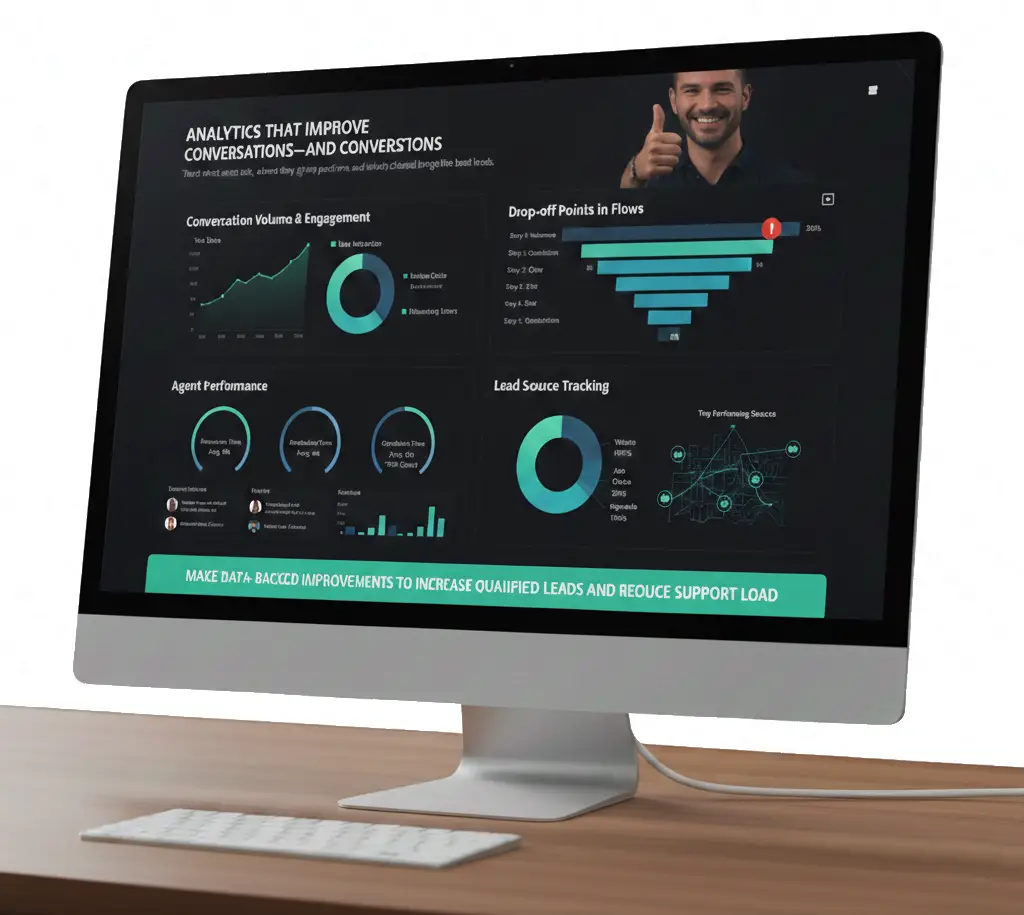
Analytics That Improve Conversations—and Conversions

Track what users ask, where they drop, how agents perform, and which channel brings the best leads.

What you’ll see in the dashboard
  • Conversation Volume & Engagement: Total chats, replies, button clicks, and returning users to measure user interaction and engagement.
  • Drop-off Points in Flows: Step-wise funnel view to identify where users leave the conversation so you can optimize and fix the flow.
  • Agent Performance: Monitor response time, resolution time, open vs closed chats, and overall agent workload.
  • Lead Source Tracking: Identify top-performing lead sources such as Ads, Website, QR codes, or Keywords.
Outcome line

Make data-backed improvements to increase qualified leads and reduce support load.

How We Launch Your WhatsApp AI Chatbot

  • Setup WhatsApp Business API

    Verify business, connect number, configure messaging basics

  • Build Chatbot Flows

    Menus, FAQs, lead forms, routing rules, and handoff points

  • Integrate + Go Live

    Connect CRM/website/Sheets/webhooks (as needed) + testing + launch

  • Track + Optimize

    Review analytics, improve drop-offs, refine flows, scale campaigns

Get Started with a Transactional SMS Service Provider (Demo & Onboarding)

Request a Demo: Transactional SMS API Setup & Pricing

Need immediate assistance? Call us now at +91 9230996919 or drop an email at support@turaingrp.com

Smiling support executive holding a laptop for customer assistance

Frequently Asked Questions

Find answers to common questions about our AI chatbot features and usage.
  • It can reply instantly, answer common questions, collect enquiries, book appointments, and send chats to the right team.

Schedule a Consultation
Chat on WhatsApp